Showing posts with label Softwares. Show all posts

Saturday, April 28, 2012

Activate In Built Windows 8 Flip 3D Feature - Simple Guide


1. Press Windows Key + R to open run prompt and then type gpedit.msc and press enter.

2. Now navigate to Computer Configuration >> Administrative Templates >> Windows Components >> Desktop Window Manager – Locate the settings in the right page which says Do not allow Flip3D Invocation – double click this entry to change the settings and then select disabled so that Flip 3D gets enabled.


You should know the following info about this windows 8 setting. This policy setting allows you to configure the accessibility of the Flip 3D feature. Flip 3D allows the user to view items on the Windows desktop as they are being flipped through in three dimensions. 


If you enable this policy setting, Flip 3D is inaccessible.

If you disable or do not configure this policy setting, Flip 3D is accessible, if desktop composition is turned on. When Windows Flip 3D is activated with the Windows+Tab keys, a visual version of the desktop is presented and items can be flipped through to select. 
Please Note: Changing this policy setting requires a logoff for it to be applied only then you will be able to see Flip 3D in effect.

Super MP3 Recorder - to record whatever your pc play


Super Mp3 Recorder Professional, the powerful recorder, editor and player, makes a complete recording studio of your computer. With the recorder you can record voice from microphone, internet streaming audio, or music played by Winamp, Windows Media Player, Quick Time, Real Player, Flash, games, etc. Super Mp3 Recorder Pro is able to automatically detect the recording formats your sound card supports and then set the application's parameters for the best possible performance. The recordings can be saved as .mp3, .wav, .wma, .vqf and .ogg files. What makes Super Mp3 Recorder Pro more powerful is its editing feature. It can edit audio files as you desire by cutting, copying, pasting, trimming and various DSP effects. Another useful feature is recording schedule which enables automatic recording, that is, Super Mp3 Recorder Pro starts and stops recording at any time you want.

Super Mp3 Recorder Pro has a Voice Activation System with which you can choose to skip silent passages, or stop the recording after a certain amount of silence. This option is especially useful when you're recording streaming audio and net congestion temporarily stops the stream. Instead of having a big blank spot in your recording, Super Mp3 Recorder Pro will just pause and wait for the signal to reappear.

Features:

  • Powerful Recorder:
Super Mp3 Recorder Pro can record any signal played through your sound card into Mp3, Wma, Vqf, Ogg or Wav files.

  • CD Quality Recordings:
With its powerful sound engine Super Mp3 Recorder Pro produces CD quality recordings.

  • Audio File Editing:
Super Mp3 Recorder Pro can edit audio files as you desired by cutting, copying, pasting, trimming and various DSP effects.

  • Recording Schedule:
Super Mp3 Recorder Pro can start and stop recording at any time you set.

  • Easy-to-use User-friendly Interface:
Most functions can be called up with a simple mouse click or menu selection.

  •  Flexible Setting:
Super Mp3 Recorder Pro is able to automatically detect the recording formats your sound card supports and then set the application's parameters for the best possible performance. The default parameters work in most cases, but you can change them easily to best suit your needs.

  •  Record Volume Control Support:
Super Mp3 Recorder Pro integrates the complete set of record volume control for your convenience.

  • Direct-To-Disk Long Time Recording Support:
Super Mp3 Recorder can record on the fly for as long as your like without interrupt. It can record and save to an mp3 file in one operation instead of having to save it to a wav and then spend time converting.

  • Recording History Management:
Super Mp3 Recorder Pro enables you to manage recording files conveniently.

  •  Voice Activation System:
Super Mp3 Recorder Pro has a Voice Activation System with which you can choose to skip silent passages, or stop the recording after a certain amount of silence.

  • Hotkey Support:
Super Mp3 Recorder Pro supports hotkey setting (F8 to start recording and F9 to stop recording by default).

  • Much, much more ...

Download Code:
http://rapidshare.com/files/146095712/Upload.From.iLachva.SMP3R.rar

Download and Install Allok 3gp PsP Mp4 iPod Video Converter Free Full Version - Latest

Allok 3gp PsP Mp4 iPod Video Converter by Allok Soft Inc. is a software that can convert a video file to 3gp, Psp, Mp4, iPod etc. file type. I do really like this software specially when I am grabbing some music videos from Yotube I can easily convert my grabbed video to mp3, VCD Mpeg 1 so I can burn it in CD, DVD Mpeg for my DVD Collections, and sometimes in 3GP so I can send it to my mobile. Allok 3gp PsP Mp4 iPod Video Converter is one that I recommend specially in your business like Internet shop in order to expand your market and also for personal computer users who has a hobby of collecting music, videos and different music gadgets. Another thing I like in this software is his converting speed one mp3 file in 10 seconds.


Download Allok 3gp PsP Mp4 iPod Video Converter here: http://www.mediafire.com/?gxe23qzungn


Instructions on how to Install Allok 3gp PsP Mp4 iPod Video Converter:


First you have to download the software by copying the url and pasting it in a new tab then click download.

Second you have to extract your downloaded file by using right click then extract here. Note: recommended software to extract is "winrar".

Open extracted folder and double click setup icon.

The Allok 3gp PsP Mp4 iPod Video Converter setup wizard table will show, just click "Next".

Then the Licence Agreement table will appear click 'I accept the agreement' and click "Next".

Next table is select destination location there is already a default destination folder given if you want to change it click browse and select a location then click "Next".

Then you have to select a start menu folder then click "Next".

Next is select additional task like creating a desktop icon and quick lunch icon (optional) then Click "Next".

Setup is ready to install just click "Install".

Click Finish and the software will lunch. View the 'Read Me' text document then copy and paste the name and code to register your copy.

Allok 3gp PsP Mp4 iPod Video Converter is ready to use so enjoy.

Friday, April 27, 2012

What are the Best 10 File Explorer Apps For Android?

Top Android File Explorers


One of the sweetest advantages I find in Android over iOS and WP7, is the ability to use an Android device as a USB mass storage medium without any strings attached, and with that, the ability to go through all these contents right on your mobile phone or tablet. Delete, copy, move, rename are all very powerful options that otherwise, are way more restricted on an iPhone and a WP7 device. Not surprisingly, the Android market is flooded with File Explorer apps, and a new user is left bewildered with the choices at their disposal. Which one would you pick if you were new to Android and why? It is to answer this question we have grouped together, what we believe, are the 10 most brilliant file explorers for Android out there today.


Root Explorer

Easily the most popular and most needed app out there today. This app, despite being a paid one, appeals through it’s core functions, that are to access system files on an Android device and gives you read/write access within those folders as well. To say the least, any Android device that has root access, deserves to be running Root Explorer, for you will find yourself in need of it almost every time.


Root Explorer Root Explorer
Download Root Explorer

File Expert

The UI on this app is extremely user-friendly, and the app will see all your file exploring needs satisfied. Accessing your files is a given, but the app lets you connect to cloud storage services such as Dropbox, Baidu Cloud, Box.net and a few others, access FTP servers, share content over Bluetooth, Web and more as well. To add some eye-candy, the UI can be overhauled with some themes as well. You can get this app for free of the Play Store; however, if you want root access for system files, you will have to purchase the Pro version.
File Expert File Expert-2

ES File Explorer

Boasting what is easily one of the finest user interfaces an Android file explorer can offer, ES File Explorer has a plethora of features to offer, including root access, for free. Access files over LAN, FTP, Bluetooth, Internet (box.net, Dropbox & Sugarsync), manage your apps or use it as a task manager, you name it, ES has got it! Oh, on a side note, you can theme up a few things in the UI as well.
ES File Explorer ES File Explorer-2

MIUI File Explorer

When I first used the MIUI ROM on my Desire HD, the one thing that really caught my attention – apart from iPhone like UI – was the inclusion of a native File Explorer. With a very well and neatly laid out interface, the app can filter content based on music, videos, zip files, pictures etc. Moreover, you can also access content over FTP, which is set up in a single tap and you’re good to go. Earlier only available for MIUI ROMs (bundled with them), the app has now been released for the public owing to the popularity it received. MIUI File Explorer is a to the point, simple, no-nonsense file explorer app for Android. 
MIUI File Explorer MIUI File Explorer-2
File Manager ES
Dual-pane, you say? File Manager ES takes that concept a step further, letting you open as many different file browser panels on a single screen as required. You can move files from one directory to another by simply dragging and dropping them on the desired directory. Much like a history function, the app lets you bookmark important directories that you navigate through often. It supports swipe gestures to help you navigate through the various file explorer panels easily. To add icing to the cake, the app gives you root access to complete system files as well, for free! 
File Explorer ES File Explorer ES-2

FileSlick

FileSlick is yet another file explorer app that uses swipe gestures as part of its navigation functions in and out of folders, as well as boasting some pretty slick aesthetics. The app goes on to offer some complex functions as well, such as toggling read/write permissions for various mount points, modifying user permissions for root mode and Server Message Block (SMB). 
File Slick File Slick-2
Total Commander
Not released to the Play Store even after all this while, the app certainly deserves some attention. Sporting Dual Panes, “file selection in Total Commander is even easier. Tap on the icon/thumbnail of a file to select it. You can select multiple files at once in this manner. To open a file, just click on its filename.”  The app supports a built in text editor, along with the ability to handle encrypted ZIP and RAR archives. 
Total-Commander01 Total-Commander02
Ghost Commander
They say, Total Commander got it’s que from Ghost Commander, and well, all we know is that Ghost Commander was the first on the scene with a dual pane for exploring files. In addition to the features offered by Total Commander, you have thumbnail views, favorite folders and a built in text editor. That said, the UI isn’t exactly the most pleasing we’ve seen so far.
Ghost Commander Ghost Commander-2

Super Manager

One of the most comprehensive file managers out there, and well, to be honest, it’s more than just a file manager. It is a Task Manager, APK Manager, App protector, File Manager, Backup & Restore tool, Auto Scheduler, all built into one package. Super Manager allows you access to root level files as well, and lets you extract APKs from installed apps and much much more. You have to actually try this app out to understand the plethora of functions it offers.
Super Manager Super Manager-2

Android Commander

Aptly titled as a Swiss knife for Android devices ,Android Commander is a lot more than your average file explorer. With a desktop client for interfacing with your Android device (of course, you’ll want root access), Android Commander is your one stop shop for exploring all the the content in your device, installing apps straight from the PC, installing and copying stuff into root level folders and a lot more. With well laid out graphics and information, the application is actually much easier to use than what it may appear from reading this. Our comprehensive review of Android Commander is linked above.
Android-Commander-Main-2
This concludes our list of what we believe to be some of the most important and effective file explorer apps out there for the Android devices.

Honorary Mention: ASTRO File Manager

Oh wait, we missed out ASTRO File Manager! One of the oldest file manager apps out there, the app is still kicking and has some awesome features out there to offer. App backup, built in image viewer, text editor, download manager etc. This is an honorary mention for a true veteran! The app has pretty much those functions to offer that most other File Explorers offer as well, and this by no means suggests that Astro File Manager fails in comparison to those apps. Alongside an SMB and Bluetooth plugin to add OBEX FTP support for browsing devices and sending/receiving files using Bluetooth networking, the app goes on to offer a totally free ASTRO Backup, a cloud service of its own.
Astro File manager Astro File manager-2
Do you have a favorite? Did we miss out on an app you’re crazy about, and feel we should have featured here? Do share your thoughts and suggestions with us in the comments section below.


Monday, December 12, 2011

Android on VirtualBox


Android, which is one of the most revolutionized mobile OS introduced by Google has come long way since its first introduction. recently Google released Nexus One phone which was said to be good by Linus too. so, everyone would like to experience Google Android although you have no Android supported phone. here's a way with your favorite VirtualBox.

Step 1 :
Download the 2 latest CD images.


Step 2 :
if you are on windows use PowerISO or something to combine these two CD images 
OR
if you are on Linux change directory to the directory where you put your image files and simply type the following:

cat liveandroidv0.3.iso.001 liveandroidv0.3.iso.002 > liveandroidv0.3.iso


(make sure that you have typed the correct version number as mentioned in the image file)


Step 3 :
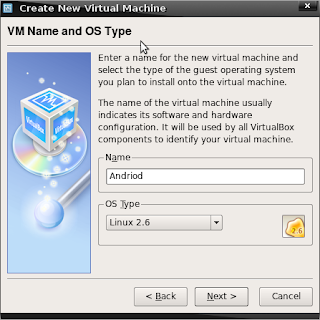
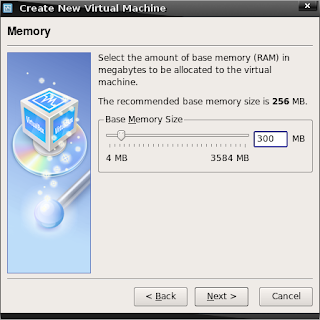
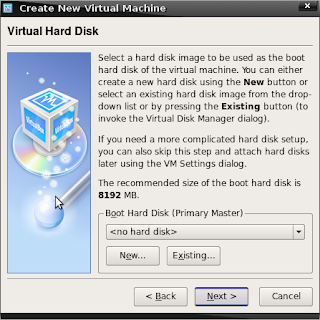
Start VirtualBox and create a new virtual machine : select Operating System as Linux 2.6 and give 300+ MB for Base memory and you don't need to create a virtual hard disk.


Step 4 :
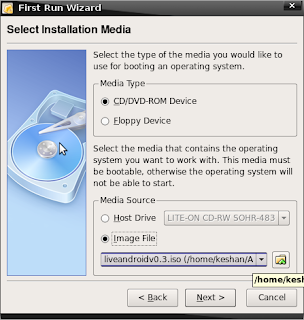
Start the newly created Virtual machine : and in the wizard choose CD/DVD-ROM Device as Media type and Image file as the source. simply select the location of your CD image to that place.


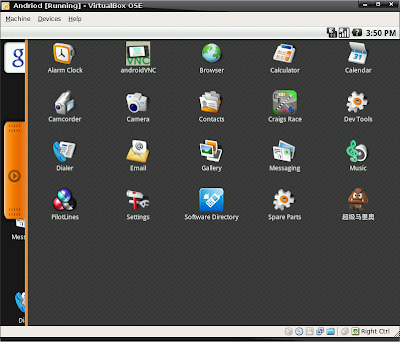
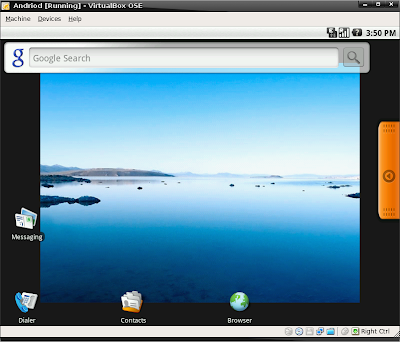
That is it.... now you will boot into Android OS have fun........


Controls :
Arrows - Navigation
Enter - confirm
Escape - back
windows key - home

Tuesday, December 6, 2011

How To Convert Videos Into HTML5 Formats With Free Make Video Converter?


Remember previously-covered Free Make Video Converter that included a host of file and device-based video conversion presets to quickly convert videos into required format? The application has just been updated to 3.0, bringing new video conversion presets for Nokia, Samsung, Andriod mobiles, BlackBerry, DVD conversion options, and significant speed improvements. Apart from newly added presets and under the hood enhancements, it can now convert videos into HTML5 formats, allowing you to create videos in Ogg, Theora, WebM, H.264 formats for your HTML5-based websites. Once the conversion is completed, it generates HTML5 video embed code, so that you can easily insert the video into required container of the webpage.

All the video conversion presets are accessible from the bottom of the window. To convert video into HTML5, drag the video over the main interface and use the scroll button to pick HTML5 preset. It will ask you to specify the format and output video quality. Once done, specify the output folder, check the output file size, and then click Convert to begin the process.


Just like with other presets, you can edit the video using built-in video editor before starting the conversion. Andriod video conversion option is updated with more presets, and you may view the newly-added presets by clicking to Android from the bottom row, and then exploring the drop-down menu. As of now, it only supports video conversion for 2 Nokia handsets, including N900 and N800, and Samsung Captivate SGH-1897. Hopefully, the developers will add more device presets in next iteration. It works on Windows XP, Windows Vista and Windows 7.

Saturday, December 3, 2011

What are the features of Google+ Android App Updated version?

The official Google+ client for Android has received a timely update (to v1.0.7) with a plethora of useful features that would surely help it compete better with some of the other hot-running social apps among users (Facebook in particular). For starters, it adds support for the much anticipated group video chat feature better known as Hangouts. Also added to the updated client of Google+ for Android are some other sought-after features which we shall delve into after the break.


If you have an Android device with a front-facing camera and Android 2.3 or above, then the news of the addition of Hangouts to the Google+ client would surely delight you. For other users, it’s just a matter of time before this feature is available for their devices as well. We put the Hangouts feature to test on our Nexus S with quite satisfactory results. To our (rather pleasant) surprise, an active Hangout session keeps running in the background. To alert you of your active Hangout, the app displays a notification icon in the status bar.

Glancing at some of the other features included with the updated Google+ client for Android, we find that users can now set their profile pictures from within the app. Other noteworthy additions made to the updated client include sharing photos in Huddle (now known as Messenger), long pressing on posts in stream to +1, share and mute them and improved SMS support (for users in India only). In addition, the app brings enhanced public search and App2SD support along with extensive settings for your Google+ notifications.


To set a new profile photo, just tap on the Profile button, tap on the profile photo thumbnail, then pick one from the gallery or simply grab a fresh one instantly from your camera.

As mentioned earlier, Huddle is now called Messenger and allows you to share photos with your contacts. You will notice a camera icon besides the text message field on the conversation screen. Tap on this icon to pick an image from the gallery or capture a new photo. Tapping on a shared image displays it in full screen.


To enable/disable notifications for selective activities in your Google+ network, go to Menu > Settings > Notification Settings.

To install Google+ app on your device for the first time or to upgrade the existing installation, visit the Android Market link or simply scan the QR code provided below.
Google+ App For Android

Ever since the advent of social media (back in the age when Friendster and MySpace ruled) the social networking industry has enjoyed rapid growth. Most of the people reading this post must know that a Tweet doesn’t have much to do with the chirping of a bird and the word “Wall” is sure to make you think of Facebook. That’s the kind of influence social networking holds over our daily lives these days. Seeing the success of social networking, how can the giants of Internet refrain from entering the fray? Yes, you guessed it, Google is launching a new project called “Google+” that’s all about social interaction.


Let us delve into the features of this Android app one by one. The full app is actually a combination of collaborating utilities working together to give a complete interactive environment.

Stream: “Stream” is the place where you can share your thoughts, news and other things with the people you choose to interact with. You simply post anything here and it is shared with your contacts.

Huddle: “Huddle” lets you send messages to multiple users simultaneously. This is a pretty old facility but one that’s long been marred by bugs, flaws and inconveniences. Google+ is hopeful to give the perfect group messaging experience.

Circles: Privacy is the biggest downside when it comes to social networking. When online, it’s a little complicated to share the right information with the right people. “Circles” comes up with just the right solution to this problem. You can have distinct online social life among your family and colleagues or any other group. What you share with your friends doesn’t necessarily needs to be told to your family too!

Other features: There are a bundle of other really cool features that leave Google+ looking like a good prospect for the future. “Spark” helps you strike up a conversation on any topic of your choice. “Photos” saves and shares your photos and albums. There are also location-based services available for Android users that let you navigate, choose a place you want to visit and tag the locations which are new to you.

That’s pretty much it. The project is in closed beta phase and the app for your Android device is available on the Android market. Fingers tingling to get your hands on this latest hot-cake of an app? But wait, here’s the catch, the testing version is invite only and you need an invitation from Google to download it. Here’s the link where you can request an invite. So just write to Google and you just might get an exclusive invitation to use what could be the social networking giant of tomorrow.


For any further information on the app, you can follow the link to the official Google blog.

How To Install Windows 8 On A Windows 7 Tablet ? - Simple Guide

If you have a tablet capable of running the Windows 7 operating system, then you might be interested in trying out a more tablet-oriented Windows OS, i.e., Windows 8. Although the currently available Windows 8 build is still in its pre-beta stage, however, you might find the new Metro UI to be more suitable for your tablet. In this post, we will provide you with a guide for installing Windows 8 on a Windows 7 tablet.


Disclaimer: Despite the fact that many Windows 7 PCs and tablets are capable of running Windows 8 Developer’s preview, it must be noted that installing Windows 8 on your tablet can result in issues. Please follow this guide at your own risk. 

Requirements:
  • Windows 8 ISO
  • Bootable Windows 8 USB. 
  • At least 20GB of free hard disk space (recommended)

1. Windows 8 installation from USB

Instructions:
  • Connect and boot your Windows 7 tablet from the bootable USB. To do this, you may have to change your BIOS settings.
  • Once the tablet boots from USB drive, follow the regular installation procedure to install Windows 8 on your tablet.
  • After the installation is complete, install the respective drivers (which can be downloaded from your manufacturers website).

2. Windows 8 Installation From ISO

Using this method, you can install Windows 8 on a tablet by mounting the Windows 8 ISO to a disc mounting application, and initiating the installation from the .EXE file.

Instructions:
  • Login to a regular Windows 7 session on your tablet, and make sure that you have a system backup.
  • Mount the Windows 8 ISO image with a disc mounting tool. You can pick a free disc mounting application from our compilation of the 20 best disc mounting applications.
  • Now, open the virtual disc drive and run the EXE file to proceed with the Windows 8 installation. During installation, select the Windows 7 drive to overwrite Windows 7 with Windows 8. Your Windows 7 data will be moved to the Windows old folder after the installation of Windows 8.


Although Windows 8 can be uninstalled , we recommend you to keep a backup of your Windows 7 installation to revert the changes.

How to Calculate Hash, Compare Files And Join & Split Files?

File Tools is a an opensource utility which is primarily built for splitting and joining files. It also includes checksum and comparison functions to check file chunks and joined file against original Hash value. You can set it to generate a hash file separately while performing joining or file splitting.

However, the application is not new in the software arena, the processing speed and simple usage made us cover the application. All the 4 main features are listed on the left flank, you can start out with any option you want to. Before splitting or joining files, you can enable an option for saving checksum and also compare the files. While processing, it also saves checksum file in the same folder. Under Split window, you have the options for specifying Size Presets, Size Unit and enable/disable an option for calculating checksum. It also lets you specify chunk size to fit your needs. After the settings are in place, specify the Input file, output path and name of the file. Click Split button to begin the process. Join feature only need a .001 to be specified to begin the file joining process.


It displays all the information of processes being carried out and if selected calculates the checksum.


While testing, it made two chunks of one hefty video file having 900MB size in couple of minutes. If you’re rarely need to use file joiners and splitters, you can give this application a try as it offers absolutely no unwanted settings and options. It supports all Windows based OS, we tested it on Windows 7 x86 system.

How To Update Your PC Applications Automatically?- Simple way

It can be difficult to keep track of updates for all your installed computer applications. R-Updater simplifies this task and provides a convenient solution for keeping all your software programs up-to-date.

The portable application offers a user-friendly interface. Upon launching the program, it will instantly check your system to create a list of all applications currently installed. After populating the list, it will scan the applications for their updated versions. You will be prompted for updates that are found.

The application makes it super simple to navigate from one list to the other. All options and buttons are clearly highlighted. Search filters enable you to instantly look for a particular program. Additionally, you can also add applications manually to the system. The application also features a Give Away Of the Daywhere one application is offered as a freebie everyday.

The application highlights program updates under three columns – New Catalog Version, New Users Version and New Beta Version. A description for this classification is not given on the product or developer site.


For advanced options, go to Settings from the bottom. You can configure the columns and trays that are to be displayed. You can also configure your Internet connection from the Internet tab. Scheduler tab enables you to specify a period after which the application looks for new updates.

It supports Windows 7 OS; testing was carried out on Windows 7, x86 system.